Chương 2: PE file phần 3: IAT, EAT và quy trình phân tích
Nhận diện hành vi malware thông qua import và export table, xác định kỹ thuật giấu API và áp dụng triage checklist có hệ thống để nhanh chóng đưa ra kết luận phân tích.
Phần 3: Import Address Table - Nhận diện hành vi
IAT cho biết malware sử dụng Windows API nào, giúp chúng ta dự đoán hành vi trước khi thực thi.
3.1. Cơ chế Import
Chương trình import hàm từ các DLL hệ thống:
kernel32.dll- File, process, bộ nhớntdll.dll- Native NT APIuser32.dll- Các hàm GUIws2_32.dll- Network socketsadvapi32.dll- Registry, service, mật mã
3.2. Cấu trúc IAT
Import Directory Table: mảng descriptor, mỗi DLL có một descriptor Import Lookup Table (ILT): tên/ordinal của hàm Import Address Table (IAT): địa chỉ hàm (do loader điền vào)
typedef struct _IMAGE_IMPORT_DESCRIPTOR {
    DWORD   OriginalFirstThunk;  // RVA to ILT
    DWORD   TimeDateStamp;
    DWORD   ForwarderChain;
    DWORD   Name;                // DLL name
    DWORD   FirstThunk;          // RVA to IAT
} IMAGE_IMPORT_DESCRIPTOR;
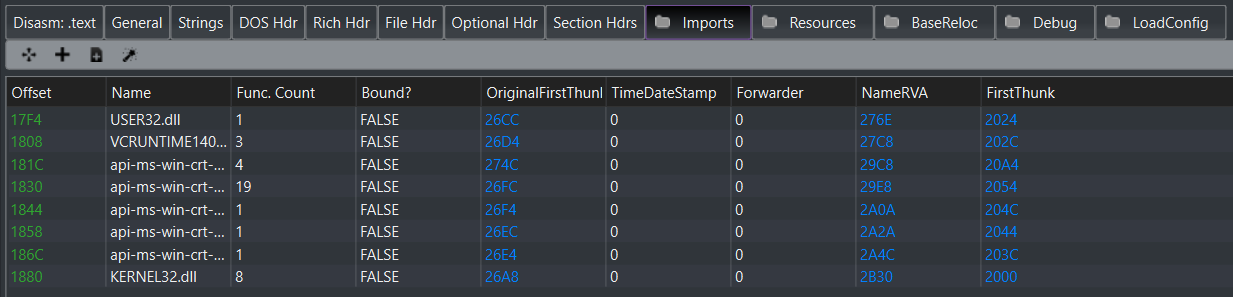
Đây là Import Directory Table của một PE file thực tế trong PE-bear:
3.3. Phân tích hành vi thông qua API
API giao tiếp mạng
WinINet (HTTP/HTTPS C2):
| API | Hành vi |
|---|---|
InternetOpenA/W |
Khởi tạo HTTP |
HttpSendRequestA/W |
Gửi đến C2 |
InternetReadFile |
Tải lệnh xuống |
WinSock (Raw TCP/UDP C2):
| API | Hành vi |
|---|---|
WSAStartup |
Khởi tạo socket |
connect |
Kết nối đến C2 |
send / recv |
Data exfiltration |
bind / listen |
Backdoor listener |
API Process Injection
| API | Kỹ thuật Injection |
|---|---|
OpenProcess + WriteProcessMemory + CreateRemoteThread |
Injection truyền thống |
VirtualAllocEx |
Cấp phát trong process nạn nhân |
QueueUserAPC |
APC injection |
SetWindowsHookEx |
Injection dựa trên hook |
NtCreateThreadEx |
Injection qua Native API |
Thao tác với file - Ransomware
| API | Mục đích |
|---|---|
FindFirstFileW / FindNextFileW |
Liệt kê file |
CreateFileW |
Mở để mã hóa |
ReadFile / WriteFile |
Mã hóa tại chỗ |
DeleteFileW |
Hành vi wiper |
MoveFileW |
Đổi tên thành .encrypted |
CryptEncrypt |
Mã hóa của ransomware |
API Persistence
| API | Kỹ thuật |
|---|---|
RegSetValueExA/W |
Registry Run key |
CreateServiceW |
Windows service |
CreateProcessW |
Chạy khi khởi động |
Vị trí persistence thường gặp:
HKLM\Software\Microsoft\Windows\CurrentVersion\Run
API Anti-Analysis
| API | Kỹ thuật Anti-Analysis |
|---|---|
IsDebuggerPresent |
Phát hiện debugger |
GetTickCount |
Kiểm tra thời gian |
CreateToolhelp32Snapshot |
Tìm công cụ phân tích |
Sleep |
Khiến sandbox hết thời gian chờ |
Cách Malware giấu IAT
-
Dynamic API Resolution
Số lượng import tối thiểu:
kernel32.dll:
  - LoadLibraryA
  - GetProcAddress

Chỉ vậy thôi. Chỉ thấy 2-3 import.
Tại runtime:
HMODULE hWS2 = LoadLibraryA("ws2_32.dll");
FARPROC pConnect = GetProcAddress(hWS2, "connect");
pConnect(socket, addr, len);
Phát hiện: Chỉ import LoadLibrary + GetProcAddress = đang giấu API
-
API Hashing
Kỹ thuật:
// No strings! Only hash
DWORD hash = 0x9E6E7D61;  // CreateRemoteThread hash
FARPROC func = ResolveByHash(kernel32, hash);
Phát hiện:
- Duyệt qua export table
- Hằng số hash trong code
- Thuật toán thường gặp: CRC32, thuật toán tùy chỉnh
-
Import theo Ordinal
Kỹ thuật:
- Import hàm theo số, không theo tên
- Khó hiểu được ý định hơn
Ví dụ:
kernel32.dll:
  Ordinal 123 (không có tên)

Thực chất: CreateRemoteThread
Gợi ý phát hiện và phân tích
Phân loại hành vi API:
def categorize_imports(pe):
    """
    Categorize APIs by behavior
    """
    categories = {
        'network': [],
        'process_injection': [],
        'file_crypto': [],
        'persistence': [],
        'anti_analysis': [],
        'dynamic_loading': []
    }

    # API signatures
    signatures = {
        'network': [
            'InternetOpen', 'HttpSend', 'HttpOpen',
            'WSAStartup', 'socket', 'connect', 'send', 'recv'
        ],
        'process_injection': [
            'OpenProcess', 'WriteProcessMemory', 'CreateRemoteThread',
            'VirtualAllocEx', 'QueueUserAPC', 'SetWindowsHookEx'
        ],
        'file_crypto': [
            'CryptEncrypt', 'CryptAcquireContext', 'CryptGenKey',
            'FindFirstFile', 'FindNextFile', 'MoveFile', 'DeleteFile'
        ],
        'persistence': [
            'RegSetValueEx', 'RegCreateKeyEx', 'CreateService', 'StartService'
        ],
        'anti_analysis': [
            'IsDebuggerPresent', 'GetTickCount', 'CreateToolhelp32Snapshot'
        ],
        'dynamic_loading': [
            'LoadLibrary', 'GetProcAddress'
        ]
    }

    # Categorize imports
    for entry in pe.DIRECTORY_ENTRY_IMPORT:
        dll_name = entry.dll.decode().lower()
        for imp in entry.imports:
            if imp.name:
                func_name = imp.name.decode()
                for category, apis in signatures.items():
                    if any(api.lower() in func_name.lower() for api in apis):
                        categories[category].append((dll_name, func_name))

    # Generate report
    alerts = []
    for category, functions in categories.items():
        if functions:
            alerts.append(f"[!] {category.upper()} capability detected:")
            for dll, func in functions[:5]:  # Show first 5
                alerts.append(f"    {dll}!{func}")

    # Minimal imports = API hiding
    total_imports = sum(len(f) for f in categories.values())
    if total_imports < 10:
        alerts.append(
            "[!] CRITICAL: Very few imports (<10) - "
            "likely using dynamic API resolution"
        )

    return alerts
Ví dụ Malware thực tế
Trường hợp 1: Phân tích IAT của Emotet
| Hạng mục | Chi tiết |
|---|---|
| Loại mẫu | Banking trojan |
| Đặc điểm Import | IAT lớn và đa dạng |
| DLL được import chính | kernel32.dll, ws2_32.dll, wininet.dll, advapi32.dll |
| DLL | Hàm | Hàm ý về hành vi |
|---|---|---|
kernel32.dll |
LoadLibraryA, GetProcAddress |
Dynamic API resolution |
WriteProcessMemory, CreateRemoteThread |
Process injection | |
ws2_32.dll |
socket, connect, send, recv |
Giao tiếp C2 trực tiếp |
wininet.dll |
HttpSendRequestA |
Kênh HTTP dự phòng |
advapi32.dll |
RegSetValueExA |
Persistence qua registry |
CryptEncrypt |
Giao tiếp được mã hóa |
Trường hợp 2: IAT tối giản - Cobalt Strike Beacon
| Hạng mục | Chi tiết |
|---|---|
| Loại mẫu | Stager |
| Đặc điểm Import | IAT cực nhỏ (5 import) |
| Chiến lược chính | Resolve động các API còn lại |
| DLL | Hàm | Mục đích |
|---|---|---|
kernel32.dll |
LoadLibraryA |
Nạp thêm DLL |
GetProcAddress |
Resolve API động | |
VirtualAlloc |
Cấp phát bộ nhớ cho shellcode | |
VirtualProtect |
Thay đổi quyền bộ nhớ | |
CreateThread |
Thực thi shellcode |
Trường hợp 3: API Hashing - Payload Metasploit
| Hạng mục | Chi tiết |
|---|---|
| Loại mẫu | Reverse shell payload |
| Đặc điểm Import | Chỉ có 2 hàm được import |
| Phương pháp Obfuscation | API hashing |
| DLL | Hàm |
|---|---|
kernel32.dll |
LoadLibraryA, GetProcAddress |
3.4: Export Address Table - Đường thực thi ẩn
Trong khi IAT cho biết file import gì, Export Address Table (EAT) cho biết file export gì - các hàm mà nó cung cấp cho module khác. Với DLL, điều này rất quan trọng vì malware thường giấu payload thực sự sau các hàm được export mà không bao giờ được gọi qua entry point thông thường.
Cấu trúc EAT
typedef struct _IMAGE_EXPORT_DIRECTORY {
    DWORD   Characteristics;
    DWORD   TimeDateStamp;       // Export table creation time
    WORD    MajorVersion;
    WORD    MinorVersion;
    DWORD   Name;                // RVA to DLL name string
    DWORD   Base;                // Ordinal base (usually 1)
    DWORD   NumberOfFunctions;   // Total exported functions
    DWORD   NumberOfNames;       // Named exports count
    DWORD   AddressOfFunctions;  // RVA to function address array
    DWORD   AddressOfNames;      // RVA to name pointer array
    DWORD   AddressOfNameOrdinals; // RVA to ordinal array
} IMAGE_EXPORT_DIRECTORY;
EAT tra cứu hàm theo hai đường:
| Phương pháp tra cứu | Đường tra cứu | Ví dụ |
|---|---|---|
| Theo tên | Tên → Ordinal → RVA của hàm | GetProcAddress(hDll, "StartService") |
| Theo Ordinal | Ordinal trực tiếp → RVA của hàm | GetProcAddress(hDll, (LPCSTR)5) |
Cách Malware khai thác Export Table
-
Payload độc hại trong hàm được export
Thông thường, hàmDllMainlà entry point của DLL và là nơi analyst tập trung phân tích. Tuy nhiên, malware có thể export thêm những hàm không được kích hoạt qua entry point tiêu chuẩn này. Các export có thể mang tên chung chung nhưInit,Run,StarthoặcUpdate, không gây nghi ngờ khi nhìn lướt qua. Khi chương trình nạp DLL,DllMaincó thể chỉ thiết lập môi trường hoặc không làm gì, trong khi payload độc hại thực sự vẫn ẩn trong một trong các hàm được export. -
Chỉ export theo Ordinal
Trong khi DLL hợp lệ thường sử dụng tên hàm rõ ràng (ví dụ:CreateFileW,RegSetValueExA), một số malware chỉ export hàm theo ordinal. Điều này khiến việc phân tích khó hơn nhiều vì analyst không biết các hàm làm gì. -
Giả mạo tên Export (Masquerading)
Kẻ tấn công có thể đặt tên nội bộ của export trùng với tên file DLL, dù file thực tế có tên khác. Ví dụ, file têndevil.dllnhưng tên export làversion.dll. Đây là thủ thuật tâm lý khiến analyst nghĩ rằng đó là DLL hệ thống hợp lệ, trong khi thực tế là file độc hại. -
DLL Proxying
Trong kỹ thuật tinh vi hơn này, kẻ tấn công tạo một “Proxy DLL” bắt chước DLL hệ thống hợp lệ. Khi loader cố gọi hàm hợp lệ, lời gọi lại được forward đến mã độc của kẻ tấn công. Ví dụ, mộtuser32.dllgiả forwardMessageBoxAđến payload của kẻ tấn công, nhưng trước đó đã thực thi một payload ẩn ở nền. Đây là kỹ thuật được ưa dùng để duy trì persistence trên hệ thống mục tiêu.
Gợi ý phát hiện và phân tích
Phân tích EAT toàn diện:
def analyze_export_table(pe):
    """
    Analyze export table for malicious patterns
    """
    alerts = []

    if not hasattr(pe, 'DIRECTORY_ENTRY_EXPORT'):
        # No exports - normal for EXEs, suspicious for DLLs
        if pe.FILE_HEADER.Characteristics & 0x2000:  # DLL flag
            alerts.append("[!] DLL with no export table - unusual")
        return alerts

    exp = pe.DIRECTORY_ENTRY_EXPORT
    export_dir = exp.struct

    # --- Check internal name vs filename ---
    internal_name = exp.name.decode('utf-8', errors='ignore')
    if hasattr(pe, '__file__'):
        actual_name = os.path.basename(pe.__file__).lower()
        if internal_name.lower() != actual_name:
            alerts.append(
                f"[!] Export name mismatch: internal='{internal_name}' "
                f"vs file='{actual_name}' - possible masquerading"
            )

    # --- Check named vs unnamed exports ---
    num_funcs = export_dir.NumberOfFunctions
    num_names = export_dir.NumberOfNames

    if num_names == 0 and num_funcs > 0:
        alerts.append(
            f"[!] {num_funcs} exports by ordinal only (no names) - "
            f"harder to analyze intent"
        )
    elif num_funcs > num_names:
        unnamed_count = num_funcs - num_names
        alerts.append(
            f"[*] {unnamed_count} unnamed exports (ordinal-only) "
            f"out of {num_funcs} total"
        )

    # --- Analyze each export ---
    suspicious_names = ['init', 'start', 'run', 'update', 'install',
                        'load', 'exec', 'launch', 'service', 'payload']

    for export in exp.symbols:
        if not export.name:
            continue

        func_name = export.name.decode('utf-8', errors='ignore').lower()

        # Check for generic/suspicious export names
        if any(s in func_name for s in suspicious_names):
            alerts.append(
                f"[*] Suspicious export name: '{export.name.decode()}' "
                f"at ordinal {export.ordinal}"
            )

        # Check for forwarded export
        if hasattr(export, 'forwarder_offset') and export.forwarder_offset:
            forwarder = pe.get_string_at_rva(export.forwarder_offset)
            alerts.append(
                f"[*] Forwarded export: '{export.name.decode()}' "
                f"→ '{forwarder.decode()}'"
            )

    # --- Entropy check on exported function code ---
    for export in exp.symbols:
        if export.address:
            try:
                # Read ~64 bytes at export address
                func_data = pe.get_data(export.address, 64)
                entropy = calculate_entropy(func_data)
                name = export.name.decode() if export.name else f"ord_{export.ordinal}"

                if entropy > 7.0:
                    alerts.append(
                        f"[!] High entropy at export '{name}': {entropy:.2f} "
                        f"- encrypted/obfuscated code"
                    )
            except Exception:
                pass

    return alerts
Ví dụ Malware thực tế
| Trường hợp | Mẫu | Kỹ thuật Export | Indicator chính | Cách phát hiện |
|---|---|---|---|---|
| 1 | PlugX RAT | Payload trong export "Update", DllMain sạch |
OEP có vẻ lành tính; "Update" chứa toàn bộ logic C2 |
Phân tích TẤT CẢ export, không chỉ DllMain |
| 2 | Cobalt Strike (Reflective DLL) | Export "ReflectiveLoader" theo tên |
Một export duy nhất với code blob có entropy cao | Tên export "ReflectiveLoader" là indicator gần như chắc chắn |
| 3 | DLL Side-Loading (nhiều APT) | Proxy DLL forward các export hợp lệ | Tên nội bộ = DLL hệ thống, nằm trong thư mục ứng dụng | Kiểm tra vị trí DLL + so sánh tên nội bộ với tên file |
| 4 | Module TrickBot | Tất cả export chỉ theo ordinal (không có tên) | NumberOfNames = 0, NumberOfFunctions = 12 |
Disassemble từng ordinal; kiểm tra calling convention |
Phần 4: Dấu hiệu đáng ngờ và Indicator
4.1. Entropy theo Section
Công cụ: PE-bear, DIE
Kiểm tra entropy từng section:
  .text > 7.0 = được mã hóa/bị pack
  .rsrc > 7.0 = payload ẩn trong resources
  Tổng thể > 7.5 = rất đáng ngờ
4.2. Overlay Data
Dữ liệu sau section cuối, không được nạp vào bộ nhớ.
Malware sử dụng để:
- Lưu dữ liệu cấu hình (C2, khóa)
- Lưu second-stage payload
- Lưu dữ liệu giả (thay đổi hash)
Phát hiện:
def check_overlay(pe):
    last_section = max(pe.sections,
                      key=lambda s: s.PointerToRawData + s.SizeOfRawData)
    last_offset = last_section.PointerToRawData + last_section.SizeOfRawData

    file_size = os.path.getsize(pe.__file__)
    overlay_size = file_size - last_offset

    if overlay_size > 0:
        print(f"[!] Overlay: {overlay_size} bytes")
Trích xuất:
dd if=malware.exe of=overlay.bin bs=1 skip=$((last_offset))
file overlay.bin
strings overlay.bin | grep -E 'http|\.exe'
Phần 6: Quy trình phân tích
Checklist Triage nhanh
□ File hash → VirusTotal
□ Compiler (Exeinfo PE, DIE)

□ PE Headers
  □ MZ, PE signature?
  □ Timestamp hợp lý?
  □ Có Rich Header?

□ Entry Point
  □ OEP trong .text? (✓) / section lạ? (⚠)

□ Sections
  □ Tên tiêu chuẩn? / Packer? (UPX, aspack)
  □ VirtualSize >> RawSize? (⚠)
  □ Entropy > 7.0? (⚠)

□ IAT
  □ Chỉ có LoadLibrary+GetProcAddress? (⚠ che giấu)
  □ API đáng ngờ? (network, injection, crypto)

□ Bảo mật
  □ ASLR được bật?
  □ DEP được bật?

□ Khác
  □ Có dữ liệu overlay?
  □ Resources chứa EXE?
Quyết định:
NẾU bị pack → Unpack
NẾU KHÔNG, NẾU IAT đáng ngờ → Dynamic analysis
CÒN LẠI → Static analysis (disassembly)
Tài liệu tham khảo: